
Editing your short videos takes forever, and lining every cut up with your song by hand feels like it never ends. Here's the quicker way to edit a music video to the beat: pick a section of your song that is a whole number of bars, start it on the downbeat, and end it just before the next downbeat. The audio then loops back on itself, and you only need to put your cuts on the beats you've already marked.
This matters more now, because on 23 September 2026 YouTube announced a Gemini editing tool for Shorts that can "trim and sync music to the beat" [1]. It won't arrive until early 2027 [2], though, and you can do the same thing by hand today in the editing app you already use. My guess is that far more Shorts will be cut to the beat once it lands, so getting the method right now puts you ahead of that.
Why edit a music video to the beat so it loops?
TikTok has said in its own words that whether someone finishes watching a longer video from beginning to end is a strong sign of interest, and it gets more weight than weak signals [3]. That's from 2020, but it's still TikTok's official explanation. A video that loops cleanly makes it hard to tell where it ends, so a viewer can slip into a second watch without noticing.
Cuts that land on the beat help too. The edit feels deliberate, and your song sounds like the point of the video. None of this depends on one app: it's just audio and cuts, so the same method works for TikTok, Instagram Reels and YouTube Shorts.
YouTube describes its new conversational editor [5] as handling "tedious tasks" so you can focus on the fun parts [1]. Until it arrives [2], the method below works in CapCut [4] or any editing app that lets you add markers and split clips.
How to edit a music video to the beat, step 1: pick a loop-friendly moment by counting bars
This is where you have an advantage over most people making these videos. You wrote the song. You know where the hook starts and how many bars the chorus runs.
If your song is in 4/4, one bar is four beats. Pick a section that is exactly 4 or 8 bars long. Start on beat one of the first bar (the downbeat). End just before beat one of the bar after your section. Because the clip is a whole number of bars, the end leads straight back into the start, and the rhythm never stumbles when the video repeats.
To work out how long that is, divide 60 by your tempo and multiply by the number of beats. At 120 BPM a bar of four beats is 2 seconds, so 8 bars is 16 seconds. At 90 BPM, 8 bars comes out at about 21 seconds.
A few things make a section loop better:
- The chord at the end leads back to the chord at the start.
- No vocal line is cut off halfway through a word at the loop point.
- The energy at the end roughly matches the start, so the jump back doesn't feel like a reset.
If the lyric spills over the bar line, try shifting your section by one bar either way. This one choice does more for the loop than any transition effect.
Step 2: mark the beats
Bring your audio clip into the editor and play it. In CapCut you can add beat markers by hand: tap to drop a marker on each beat as the music plays, the same way you'd nod along [4]. Your taps will be a little off, which is normal. Zoom in and drag each marker so it sits exactly on the waveform peak, or on the audible beat if the peak is misleading [4].
Mark at least 16 beats, which is 4 bars in common time, so you have a steady pattern to cut against [4]. For an 8 bar loop, mark all 32.
If your app marks beats automatically, check every marker by ear anyway. You know where the kick lands in your own song.
Step 3: where should you cut video to the beat?
Cutting on every beat is tiring to watch and to make. A simpler rule from one CapCut editing guide [4]:
- Use downbeats (beat one of a bar) for big changes, like a new location or a new scene.
- Use beats 2 and 4 for smaller changes, like a new angle or a close-up of your hands on the guitar.
- Hold a shot through the beat when it carries information, such as your face while you sing a key line or text on screen people need to read.
A common pattern is a new shot on each downbeat, so every four beats, with movement inside each shot to keep it alive [4]. That's a good default. Cut faster in the chorus if the song lifts there.
Step 4: how do you make the end flow back into the start?
Your audio already loops because you chose whole bars. Now the picture needs to do the same.
The easiest trick is to make the last shot match the first one. Use the same framing or the same movement. If you open walking toward the camera, end walking toward it from slightly further back. When the video jumps back to the start, it looks like one continuous move.
Don't fade the audio out at the end or fade it in at the start. A fade tells the viewer the video is over, and it creates a gap in the rhythm right where you want none. Leave the audio at full volume through the loop point.
Watch it on repeat a few times before you post. Spot the join? Move the last cut by a frame or two.
How to do this for 10 to 20 videos per release without burning out
One video done this way is fine. The trouble starts when you want to post every few days around a release. As one guest put it in a Soundfeed interview about turning songs into TikTok sounds, "If you just chase content creation, you're gonna burn out eventually" [6].
What helps is doing the slow parts once:
- Choose two or three loop sections from the song in one sitting and write down where each starts and how many bars it runs.
- Mark the beats on each section once, save that project, and duplicate it for every new video instead of starting from scratch.
- Film in batches. One afternoon of footage in a few outfits and spots can feed a whole release cycle.
- Write the BPM and bar count in the project name so you can find the right one later.
The trade-off is that templates can make your videos feel samey. Swap the footage and the song section often enough that followers don't see the same thing twice.
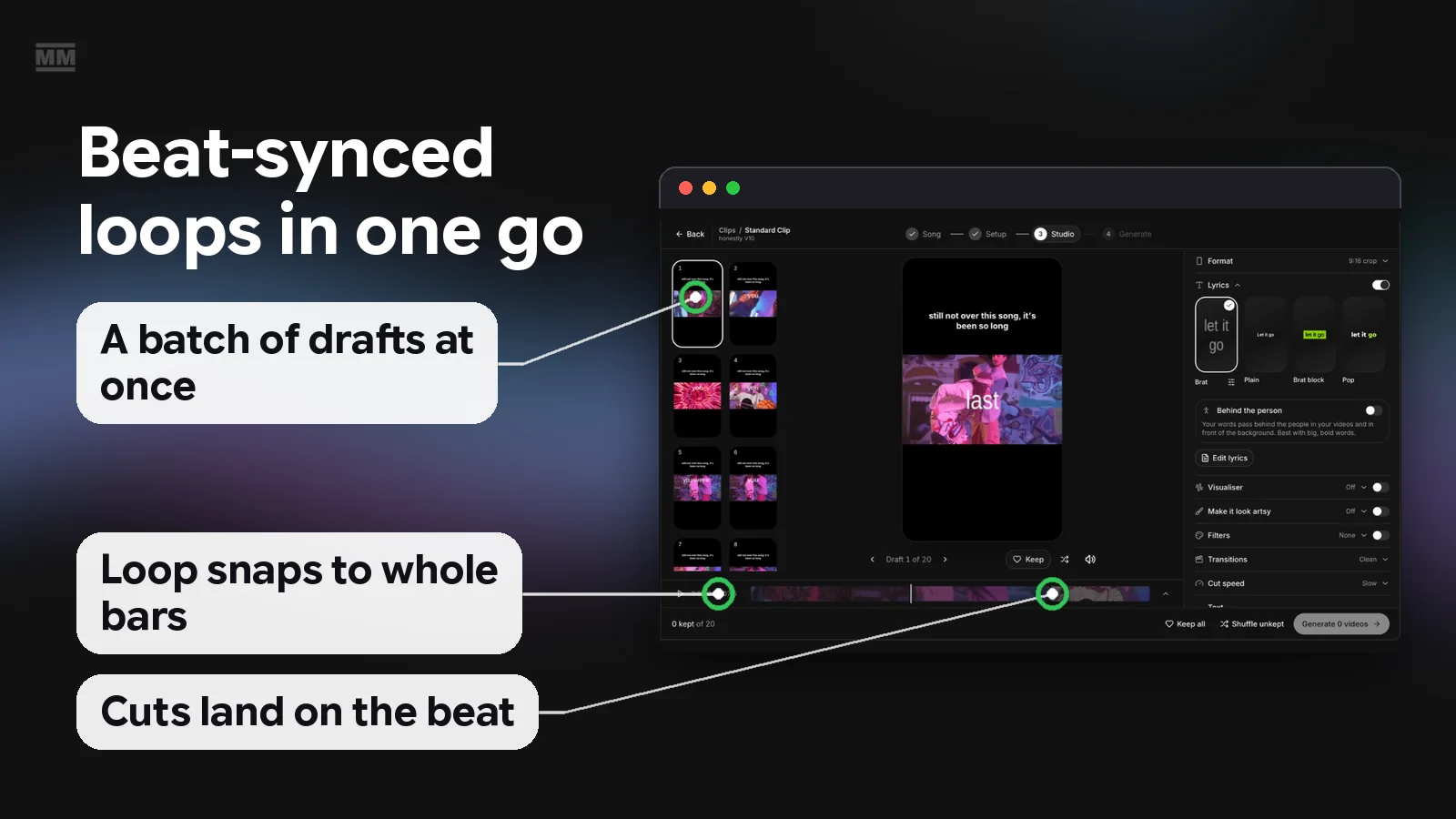
I'm building this into MusicMinutes as a feature called Clips, which is coming soon and isn't available yet. Its moment picker snaps to whole bars so each video loops cleanly, and cuts land on the beat with a cut speed setting (Auto, Slow, Medium or Fast). Keep an eye on MusicMinutes if you want it at launch. Until then, the manual method above does the same job, just slower.
Frequently Asked Questions
How long should a looping music TikTok be?
Let your song decide: a whole number of bars, often 4 or 8. At 120 BPM, 8 bars is 16 seconds. Shorter loops are easier to finish, so start short and test longer ones later.
Do I need to cut on every beat?
No. Cut on downbeats for big changes and on beats 2 and 4 for small ones, and hold a shot when it shows something important like your face or on-screen text [4].
Can I let the app auto-sync to the beat?
Try it if your app offers it, but check every marker by ear before you cut. Fixing a few by hand beats reposting a video where the cuts drift.
When is YouTube's beat sync editor available?
YouTube announced it on 23 September 2026 [1]. Conversational editing is due for YouTube Shorts and the YouTube Create app in early 2027 [2].
Does looping actually help views?
Nobody can promise more views from one edit. What TikTok has said is that someone finishing a longer video from beginning to end is a strong signal of interest [3], and a clean loop makes finishing (and rewatching) easier.
References
- [1] YouTube Official Blog: Made on YouTube new creation tools (September 2026)
- [2] TechCrunch: YouTube's conversational video editing tool (September 2026)
- [3] TikTok Newsroom: How TikTok recommends videos #ForYou (June 2020)
- [4] Cursa: Beat-based editing in CapCut
- [5] Music Ally: YouTube reveals new music features (September 2026)
- [6] Soundfeed: Inside stories, turning your songs into TikTok sounds